NAS or cloud? An honest comparison for small businesses: four questions to ask before you decide
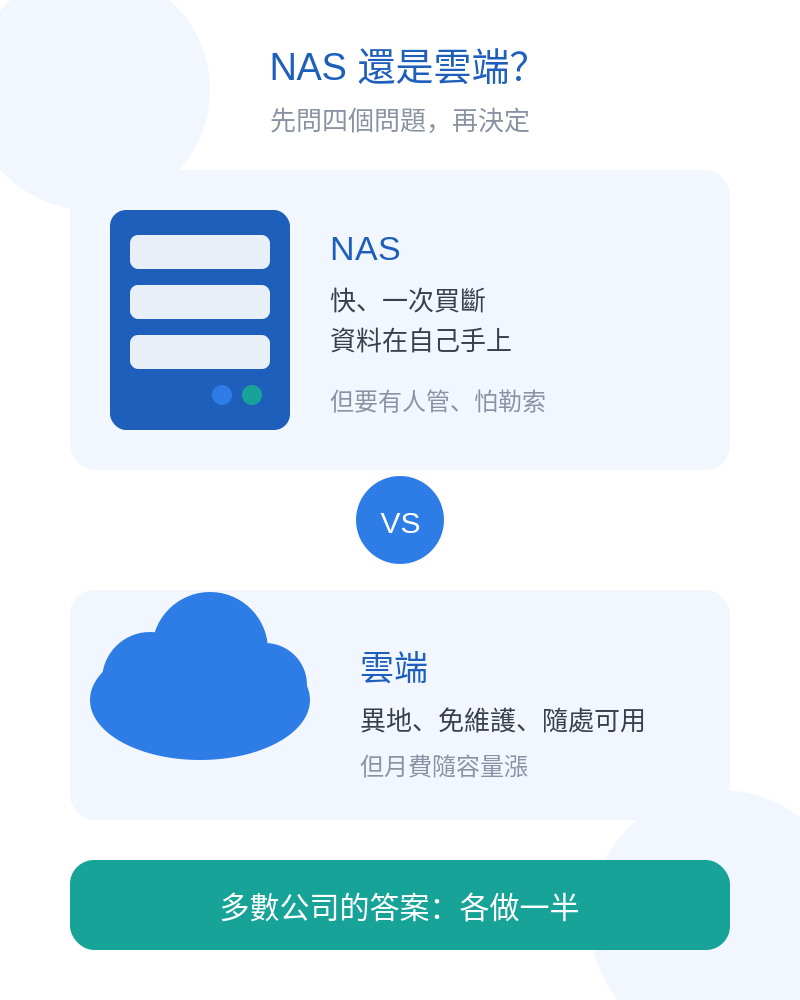
Written in 2026/11/24When a company needs to store files, the first question is usually: buy a NAS, or rent cloud storage? SMEs in Taiwan have asked this for years, and honest answers are rare — NAS sellers call cloud monthly fees a bottomless pit, cloud sellers say a NAS will sooner or later be breached by ransomware, and both are half right. This post takes no side. QNAP's own anti-ransomware checklist (updated November 2026) and a late-October comparison piece from Orbitech in Hong Kong reach the same conclusion: the NAS handles speed, the cloud handles distance, and doing half of each is the answer most small businesses can sustain. First we lay out clearly where each side wins and loses, then four questions decide your approach.
First, the three things a NAS wins — all true. One, LAN speed: files sit on the office network, and for opening large files or restoring in bulk, no cloud service can match it; uploads and downloads never depend on your internet line. Two, one-time purchase: buy the drives and the box once, and there is no monthly fee that keeps climbing per seat or per terabyte; stretched over years at several TB, it is genuinely cheaper. Three, data in your own hands: the machine is physically in the office, so if a contract or customer requires that data never leaves the company, a NAS meets that by nature. No cloud vendor's marketing can take these three away. If your file volume is large, restores need to be fast, and you care where data physically lives, a NAS has an irreplaceable place.
Next, the three things a NAS loses — also all true. One, it lives in the same place as the office: in a fire, flood or break-in, the NAS goes down with the computers, and the backup dies with the originals — two copies in one building do not count as off-site. Two, being online 24/7 makes it a ransomware target: QNAP's anti-ransomware checklist, updated in November 2026, opens with exactly this — never expose a NAS directly to the internet, patch as soon as updates ship, and keep one backup ransomware cannot touch. Ransomware only needs write access to a shared folder to encrypt the backups on the same NAS, and if admin credentials are stolen even snapshots can be deleted. Three, it needs a person: firmware updates, drive replacement, permissions, the external-access switch. An unmanaged NAS is just a computer in the corner waiting for an incident. Whether a backup survives the theft of the highest privileges is what we covered in The backup is done — who is allowed to delete it? — and NAS backups often fall exactly at that hurdle.
The three things the cloud wins patch exactly the NAS's weak spots. One, off-site: data sits in the provider's data centre, so if the office is hit, the data survives — something a NAS in the same building can never do. Two, zero maintenance: hardware failures, firmware updates and disk swaps are the provider's job, so the company does not need someone babysitting a machine. Three, anywhere access: files open on a business trip, at home, or at a client's site, and external sharing never requires opening the NAS's external connection — which is precisely the setting where a NAS gets into trouble most. The cloud loses on three counts too: monthly fees keep climbing with capacity, and the bill gets very concrete at several TB; the first upload and bulk restores depend on your internet line, so urgent restores are slow; and the most overlooked one — sync is not backup: files deleted or encrypted on your side sync straight up. What actually counts as a backup we covered in How should a company back up its critical data safely? What is the 3-2-1 backup rule?: three copies, two media, one off-site — none of them optional.
Before deciding, ask four questions. One, how much data? A long-maintained NAS buying guide in Taiwan puts it bluntly: under 100GB, just use the cloud — buying a NAS is overkill. Two, how fast must restores be? Getting several hundred GB back within half a day only a LAN NAS can do; if one day is acceptable, the cloud works. Three, is there someone to manage it? With nobody dedicated to the machine, do not bet everything on a NAS — an unpatched NAS is more dangerous than no NAS. Four, what is the worst case? Picture an office fire, a building-wide power cut, and ransomware encrypting the computers and the NAS at the same time. On that day, does your backup still exist, and where do you restore it from? If you can answer that, you have a backup; if not, whatever you buy is just peace of mind.
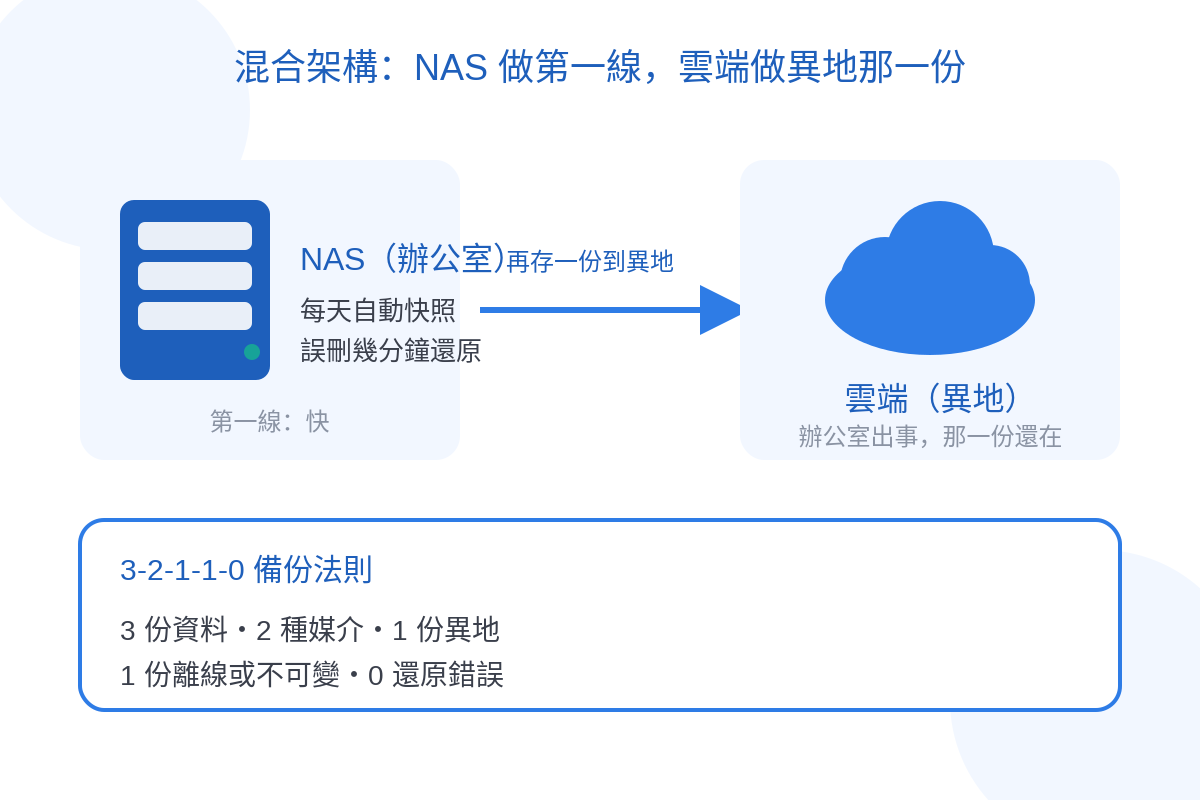
By this point the answer is usually already visible: the NAS as the first line, the cloud as the off-site copy. The NAS takes automatic daily snapshots, so accidental deletions and edits restore within minutes; the cloud keeps another copy, so if the office is hit or the NAS is encrypted, that copy survives. The backup rule in its full modern form is 3-2-1-1-0: three copies, two media, one off-site, one offline or immutable, zero restore errors. Within this architecture, CloudFiles plays the cloud half: once files are uploaded, external sharing can be set to view-only, so clients see the content but keep no copy; folder permissions can be cut layer by layer, IP restrictions pull logins back to the office's and vendors' networks; and access logs are retained for five years, so who viewed or downloaded what can always be traced afterwards. A NAS is weak at external sharing and audit trails — exactly the two gaps the cloud fills. That is why most companies end up wanting both, not one or the other.
You don't need to replace the whole setup at once. Start with your single most important folder: upload it to the cloud, give a client a view-only link, switch on IP restriction once, and pull up the access log once — then look back at the NAS side: are snapshots running daily, and has a restore drill been done this year? Only when both sides have been checked does your backup genuinely have two copies. CloudFiles offers a one-month free trial, from NT$3,000 a year with unlimited users; walk through this hybrid setup for real during the trial, then decide whether to move the whole company's file backups to half NAS, half cloud.